第11章: ライセンス
CA Policy Analyzer ユーザーマニュアル
ライセンスモデル
CA Policy Analyzer は、無料アプリ + 有料アドオンのモデルを採用しています。
基本機能は無料で利用でき、高度な機能は有料アドオンで解放されます。
プラン比較
| 機能 | Trial | Standard | Pro |
|---|---|---|---|
| ポリシー管理(読み込み・編集・削除・コピー) | ○ | ○ | ○ |
| ギャップ分析(推奨構成との比較) | ○ | ○ | ○ |
| 診断(ロックアウトリスク・競合検出) | ○ | ○ | ○ |
| 変更履歴(監査ログ) | ○ | ○ | ○ |
| ネームドロケーション管理 | ○ | ○ | ○ |
| シミュレーション(単一シナリオ) | ○ | ○ | ○ |
| 利用期間 | 15 日間 | 無制限 | 無制限 |
| シミュレーション(比較モード) | — | — | ○ |
| Excel 設計書エクスポート | — | — | ○ |
| PDF レポートエクスポート | — | — | ○ |
| ポリシー JSON エクスポート | — | — | ○ |
Trial(無料試用)
インストール後、15 日間すべての基本機能を無料でお試しいただけます。
試用期間中は画面上部にバナーが表示され、残り日数を確認できます。
試用期間が終了すると、Standard または Pro アドオンの購入が必要です。
Standard アドオン
試用期間の制限を解除し、基本機能を継続して利用できます。
ギャップ分析、診断、変更履歴など、すべての基本機能が含まれます。
Pro アドオン
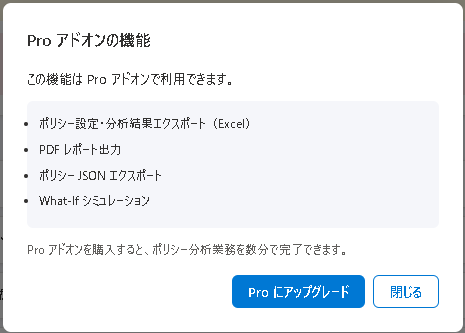
Standard の全機能に加えて、以下の高度な機能が利用できます:
- Excel 設計書エクスポート(8 シート構成)
- PDF レポートエクスポート(A4 印刷最適化)
- シミュレーション比較モード
- ポリシー JSON エクスポート
購入方法
- アプリ内の試用バナーまたは About 画面から「購入」をクリック
- Microsoft Store の購入画面が表示されます
- 「Standard」または「Pro」を選択して購入
- 購入後、アプリを再起動すると自動的にライセンスが反映されます
ライセンスは Microsoft Store を通じて管理されます。購入・返金については Microsoft Store のポリシーに従います。
Chapter 11: Licensing
CA Policy Analyzer User Manual
Licensing Model
CA Policy Analyzer uses a free app + paid add-on model.
Core features are available for free, while advanced features are unlocked through paid add-ons.
Plan Comparison
| Feature | Trial | Standard | Pro |
|---|---|---|---|
| Policy Management (import, edit, delete, copy) | ○ | ○ | ○ |
| Gap Analysis (comparison with recommended configuration) | ○ | ○ | ○ |
| Diagnostics (lockout risk, conflict detection) | ○ | ○ | ○ |
| Change History (audit log) | ○ | ○ | ○ |
| Named Location Management | ○ | ○ | ○ |
| Simulation (single scenario) | ○ | ○ | ○ |
| Usage Period | 15 days | Unlimited | Unlimited |
| Simulation (comparison mode) | — | — | ○ |
| Excel Design Document Export | — | — | ○ |
| PDF Report Export | — | — | ○ |
| Policy JSON Export | — | — | ○ |
Trial (Free Trial)
After installation, all core features are available free for 15 days.
During the trial period, a banner at the top of the screen shows the remaining days.
When the trial period ends, you need to purchase the Standard or Pro add-on.
Standard Add-on
Removes the trial period limitation and allows continued use of all core features.
Includes all core features such as gap analysis, diagnostics, and change history.
Pro Add-on
In addition to all Standard features, the following advanced features become available:
- Excel Design Document Export (8-sheet structure)
- PDF Report Export (A4 print-optimized)
- Simulation Comparison Mode
- Policy JSON Export
How to Purchase
- Click "Purchase" from the trial banner in the app or from the About screen
- The Microsoft Store purchase page will open
- Select "Standard" or "Pro" and complete the purchase
- After purchasing, restart the app and the license will be applied automatically
Licenses are managed through the Microsoft Store. Purchases and refunds are subject to Microsoft Store policies.